> ## Documentation Index
> Fetch the complete documentation index at: https://www.helius.dev/docs/llms.txt
> Use this file to discover all available pages before exploring further.
# How to Find Solana Mint, Freeze, and Update Authority
> Learn how to use Orb, a new Solana block explorer, to find the mint, freeze, and update authority for Solana tokens and on-chain programs.
Orb is a fast, human-readable Solana block explorer that can also be used as a [Solana token explorer](https://orbmarkets.io/) to find mint, freeze, and update authorities for digital assets.
## What is the Mint Authority for Solana tokens?
The mint authority controls the issuance of new tokens.
For tokens created using the [Token Program](https://orbmarkets.io/address/TokenkegQfeZyiNwAJbNbGKPFXCWuBvf9Ss623VQ5DA/history?cluster=mainnet-beta) or the [Token 2022 Program](https://orbmarkets.io/address/TokenzQdBNbLqP5VEhdkAS6EPFLC1PHnBqCXEpPxuEb/history?cluster=mainnet-beta), the mint authority of a token is set when the token’s mint account is initialized.
To change the mint authority in the future, the current owner must use the `SetAuthority` instruction and specify the new address.
If the authority is set to `null`**,** the mint authority will be permanently revoked.
If you’re using a token launchpad like Pump.fun or LetsBonk, the mint authority configuration is handled for you, and in both cases, it is set to `null`. This ensures that the creators who launch tokens can not arbitrarily issue new tokens.
### How to Find a Token’s Mint Authority on Orb
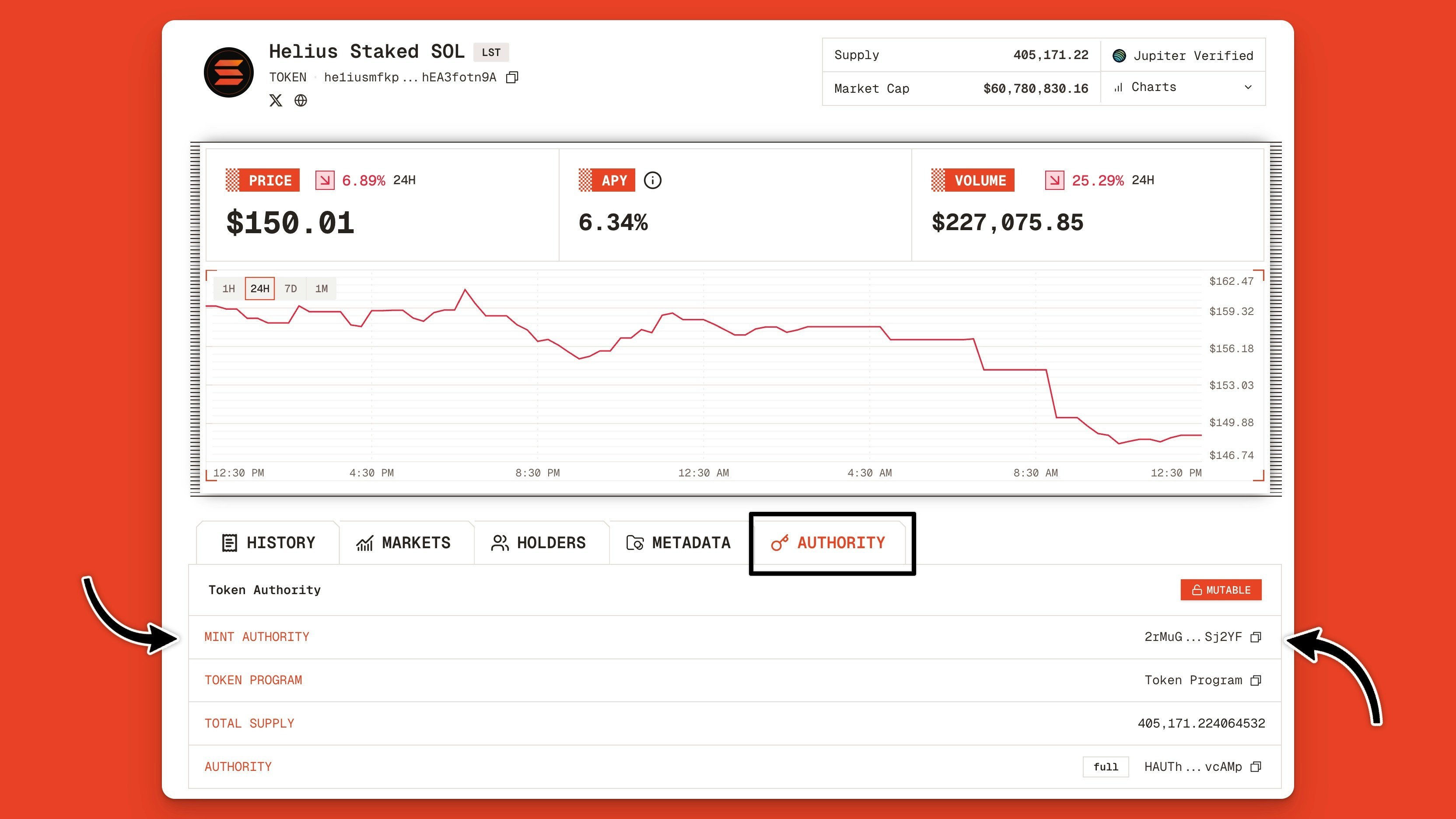
Open Orb, search for your token by name or the [token’s mint address](https://www.helius.dev/docs/orb/explore-mint-addresses), and then click the result to go to the token page.
On the token page, click the **Authority** tab to find the mint authority.
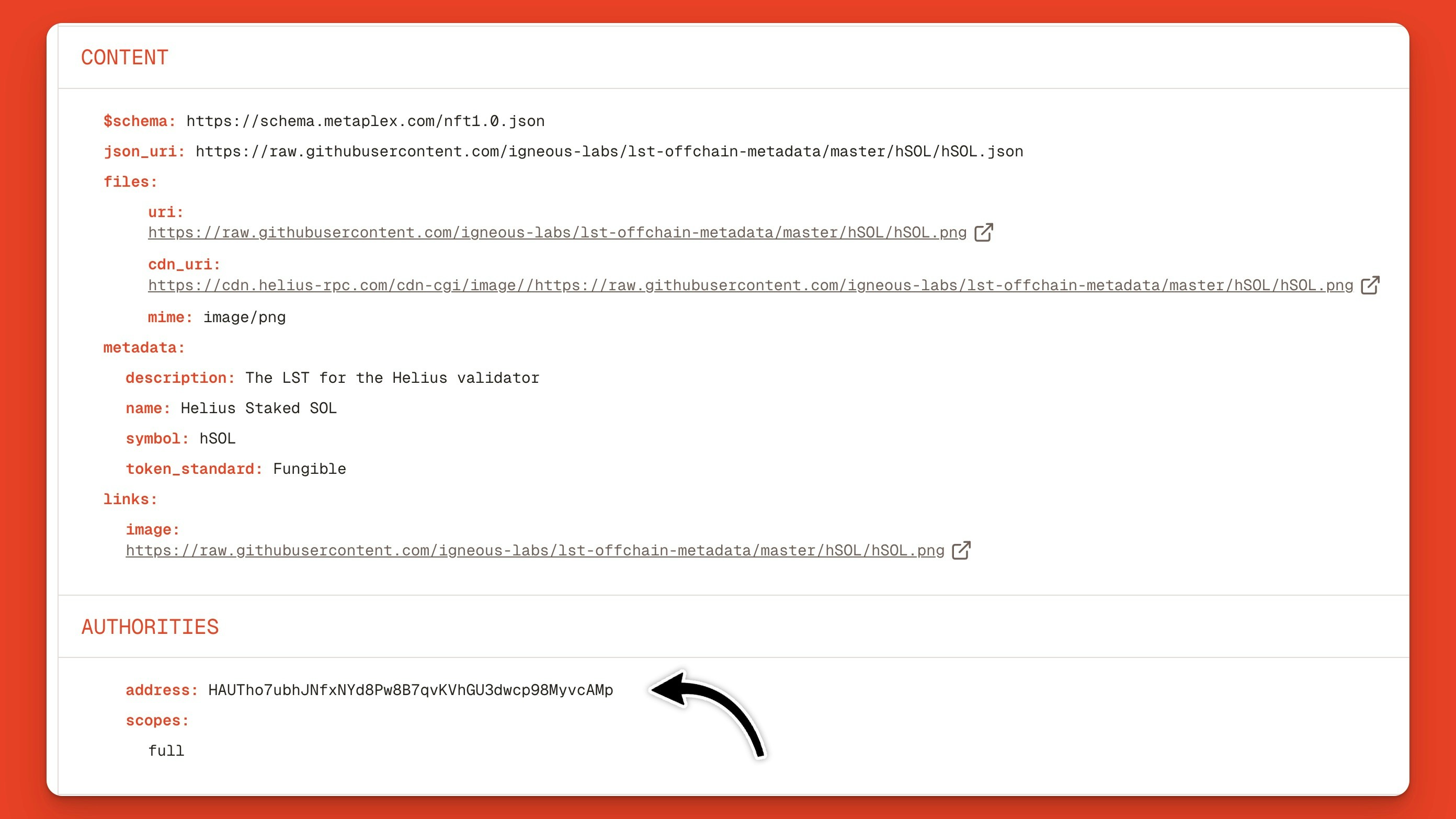
 Alternatively, you can click the **Metadata** tab and scroll down to the **Authorities** section:
 ### Mint Authority Best Practices
Every token will have different needs for managing mint authorities.
For example, ICO launchpads like MetaDAO retain full authority in case startups need to issue more tokens for governance.
The same is true for stablecoin issuers like Circle, Paxos, Brale, and m0, who must retain their mint authorities to mint and burn stablecoins as cash enters and exits the network.
In contrast, memecoin launchpads like Pump.fun set the mint authority to **null** to prevent rug pulls (i.e., prevent memecoin creators from minting new tokens and extracting liquidity.
## What is the Freeze Authority for Solana tokens?
The freeze authority enables the owner to **freeze** or **thaw** (unfreeze) individual token accounts, preventing transfers of the token out of their wallet.
The freeze authority is an important mechanism for security and compliance use cases, such as preventing malicious actors from transferring stolen assets (e.g., USDC).
The freeze authority can be used maliciously to create a honeypot: unsuspecting buyers purchase a token, but are locked from selling it because their account is frozen.
### How to Find a Token’s Freeze Authority on Orb
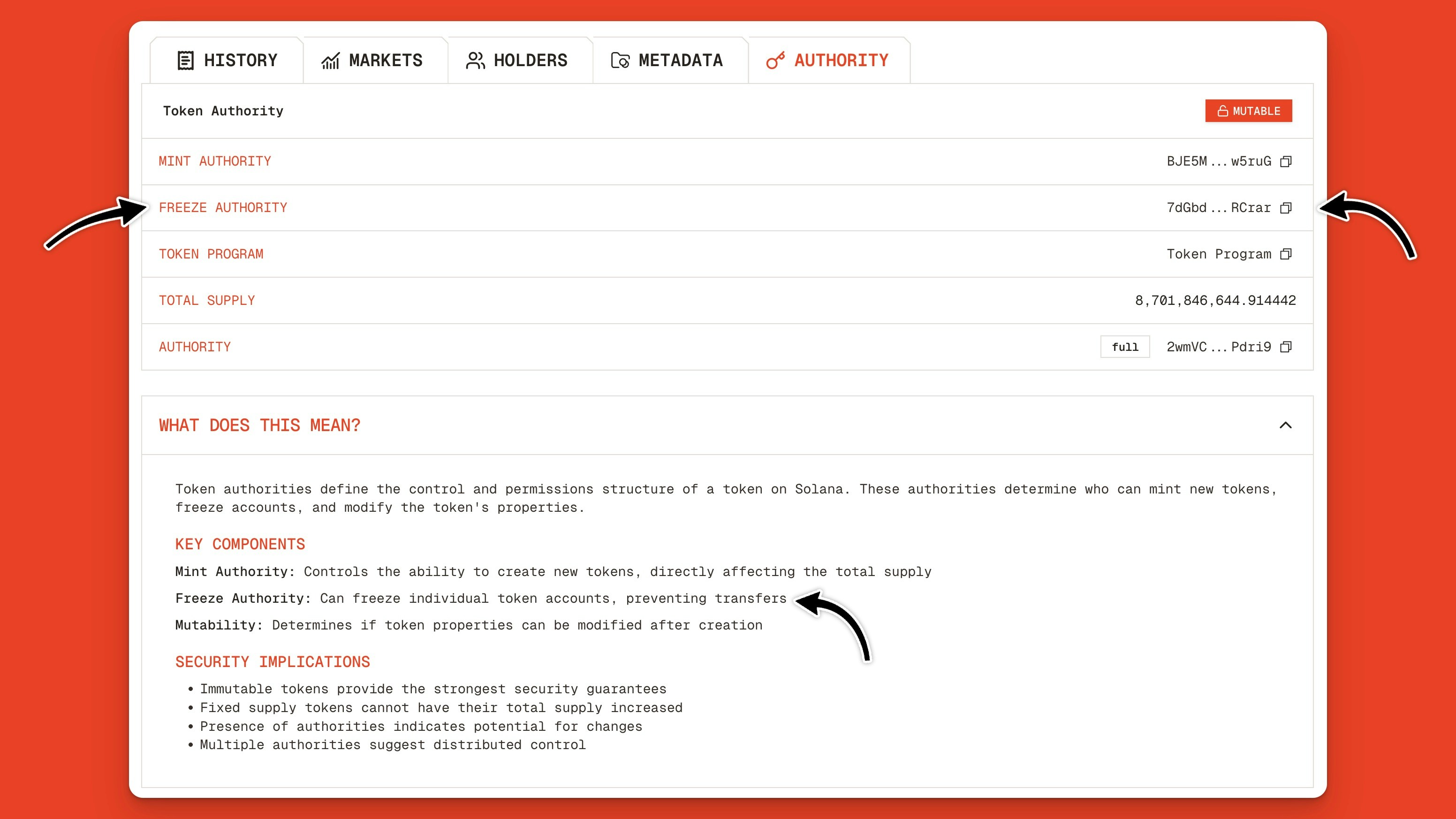
To find the freeze authority for a Solana token, [go to the token’s page](https://www.helius.dev/docs/orb/explore-tokens) and click the **Authority** tab.
In the overview section, you’ll see a row for **Freeze Authority** and the address. If there is no row for Freeze Authority present, it means there is no Freeze Authority for that asset.
### Mint Authority Best Practices
Every token will have different needs for managing mint authorities.
For example, ICO launchpads like MetaDAO retain full authority in case startups need to issue more tokens for governance.
The same is true for stablecoin issuers like Circle, Paxos, Brale, and m0, who must retain their mint authorities to mint and burn stablecoins as cash enters and exits the network.
In contrast, memecoin launchpads like Pump.fun set the mint authority to **null** to prevent rug pulls (i.e., prevent memecoin creators from minting new tokens and extracting liquidity.
## What is the Freeze Authority for Solana tokens?
The freeze authority enables the owner to **freeze** or **thaw** (unfreeze) individual token accounts, preventing transfers of the token out of their wallet.
The freeze authority is an important mechanism for security and compliance use cases, such as preventing malicious actors from transferring stolen assets (e.g., USDC).
The freeze authority can be used maliciously to create a honeypot: unsuspecting buyers purchase a token, but are locked from selling it because their account is frozen.
### How to Find a Token’s Freeze Authority on Orb
To find the freeze authority for a Solana token, [go to the token’s page](https://www.helius.dev/docs/orb/explore-tokens) and click the **Authority** tab.
In the overview section, you’ll see a row for **Freeze Authority** and the address. If there is no row for Freeze Authority present, it means there is no Freeze Authority for that asset.
 ### Freeze Authority Best Practices
For tokens where security and compliance are important, like stablecoins and Real World Assets (RWAs), maintaining the freeze authority is important. The best practice is to control this authority with a multisig. This way, no single party has control over freezing funds.
For memecoins, it’s best practice to revoke the freeze authority as soon as the token is launched. This gives holders the guarantee that their tokens cannot be frozen.
If a token’s freeze authority isn’t revoked, the creator could block holders from selling their tokens and getting their money back.
## What is the Update Authority for Solana tokens?
The update authority is part of the [Metaplex Token Metadata Program](https://orbmarkets.io/address/metaqbxxUerdq28cj1RbAWkYQm3ybzjb6a8bt518x1s/history?cluster=mainnet-beta) and the Metadata Extension in the Token 2022 Program, and enables the authority to update the token’s name, symbol, and logo.
### How to Find the Update Authority on Orb
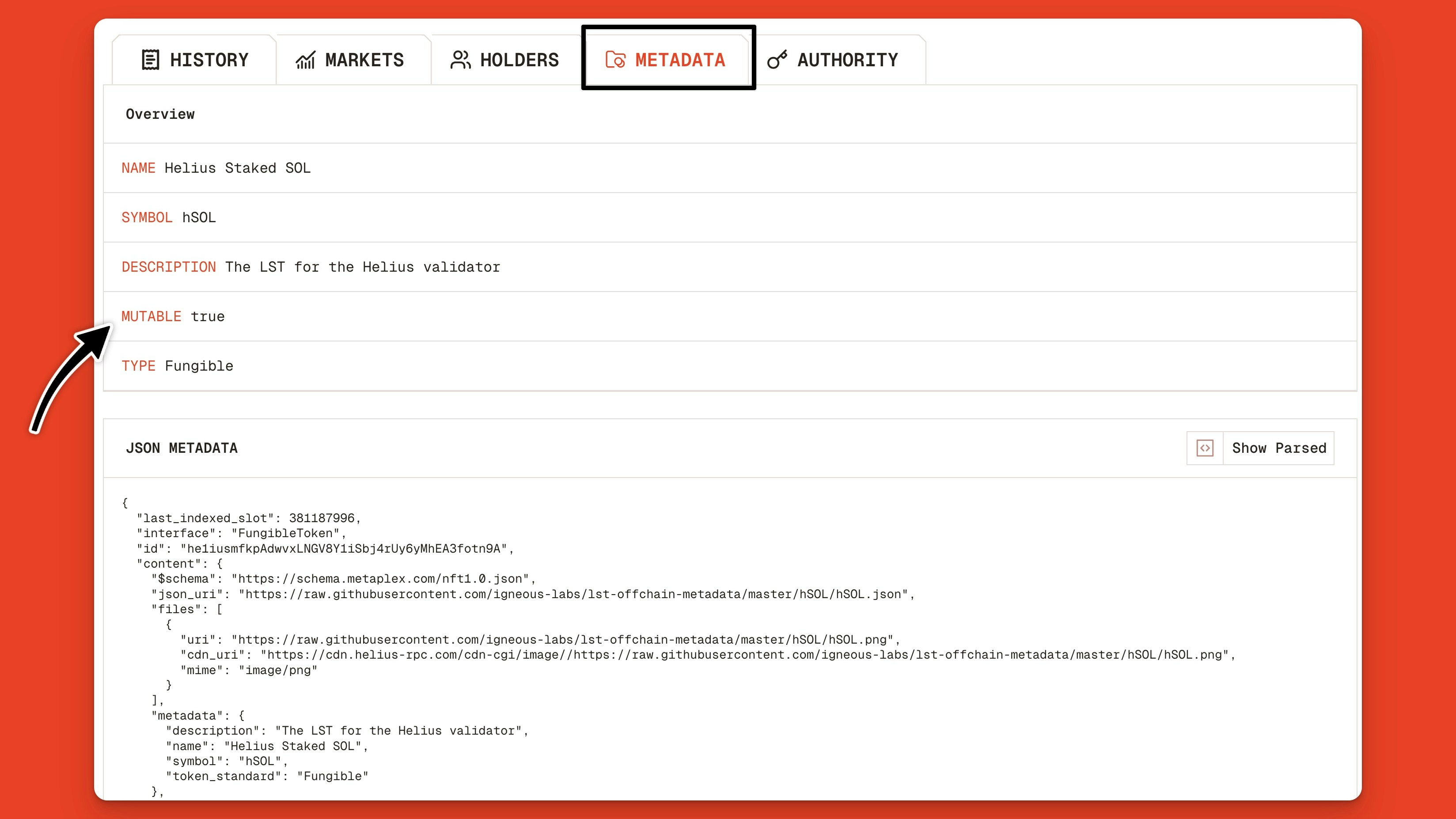
To determine if a Solana token’s metadata can be updated, click the **Metadata** tab.
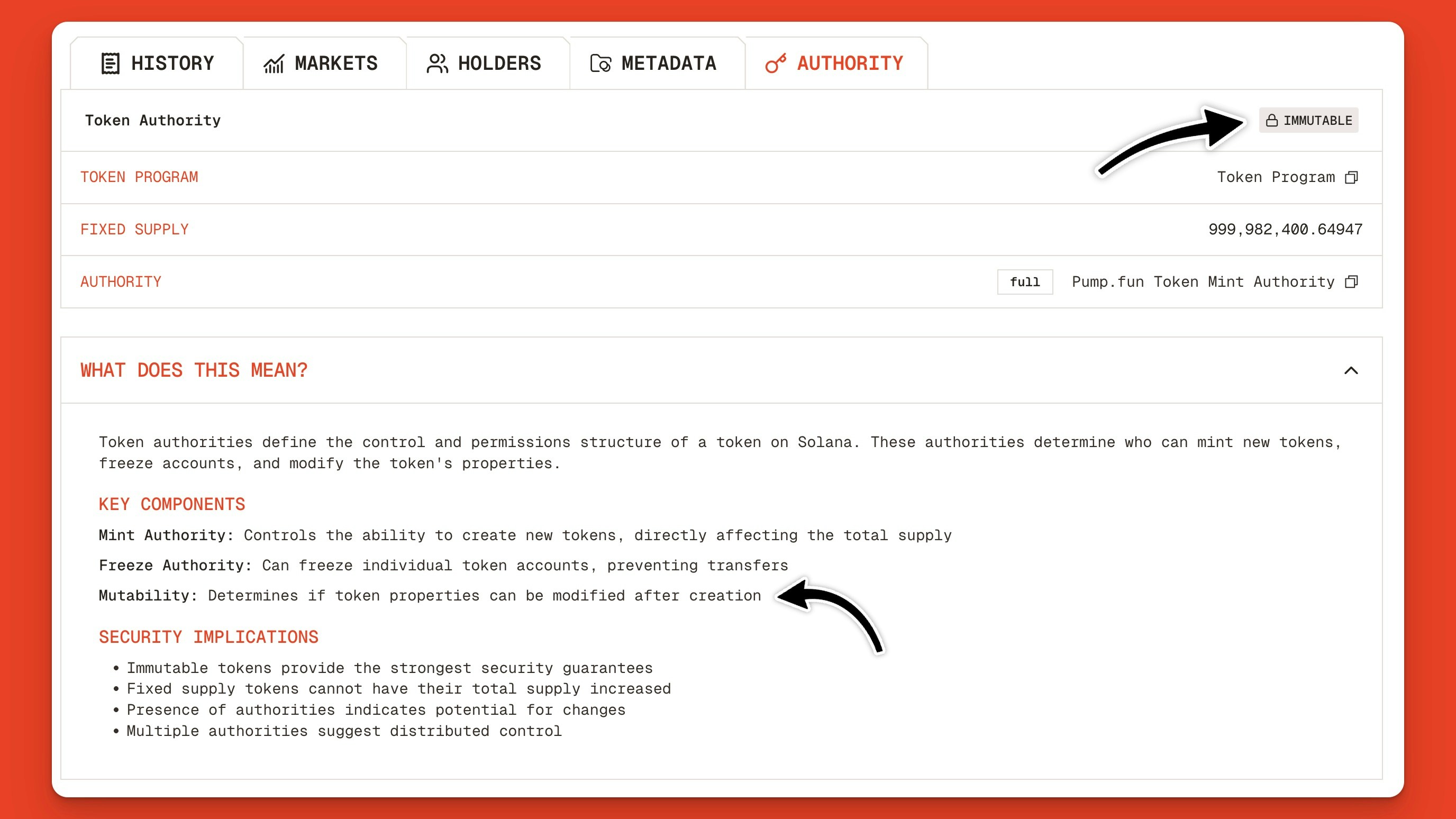
In the overview section, you will see a row for **Mutable** and a value set to true or false.
If the value is true, the token’s metadata can be changed. If false, the update authority has been revoked.
### Freeze Authority Best Practices
For tokens where security and compliance are important, like stablecoins and Real World Assets (RWAs), maintaining the freeze authority is important. The best practice is to control this authority with a multisig. This way, no single party has control over freezing funds.
For memecoins, it’s best practice to revoke the freeze authority as soon as the token is launched. This gives holders the guarantee that their tokens cannot be frozen.
If a token’s freeze authority isn’t revoked, the creator could block holders from selling their tokens and getting their money back.
## What is the Update Authority for Solana tokens?
The update authority is part of the [Metaplex Token Metadata Program](https://orbmarkets.io/address/metaqbxxUerdq28cj1RbAWkYQm3ybzjb6a8bt518x1s/history?cluster=mainnet-beta) and the Metadata Extension in the Token 2022 Program, and enables the authority to update the token’s name, symbol, and logo.
### How to Find the Update Authority on Orb
To determine if a Solana token’s metadata can be updated, click the **Metadata** tab.
In the overview section, you will see a row for **Mutable** and a value set to true or false.
If the value is true, the token’s metadata can be changed. If false, the update authority has been revoked.
 Alternatively, you can find the token’s mutability info from the **Authority** tab:
 #### Update Authority Best Practices
For most tokens, maintaining the update authority is important in case your company changes its logo, name, website, or company description.
For memecoins where metadata can be used to mislead traders with fake information and phishing links, revoking the update authority is best practice.
For example, revoking a token’s update authority is the default for all new Pump.fun tokens.
### Conclusion
[Orb](https://orbmarkets.io) is a fast, human-readable Solana block explorer that makes it easy to find the mint, freeze, and update authorities for Solana tokens.
Now that you know where to find this information, it will be easier to research tokens, verify their authorities, and make more informed decisions.
For more tutorials on using Orb, check out these articles:
1. [How to Explore Solana Programs on Orb](https://www.helius.dev/docs/orb/explore-programs)
2. [How to Explore Solana Transactions on Orb](https://www.helius.dev/docs/orb/explore-transactions)
3. [How to Explore Solana Wallets on Orb](https://www.helius.dev/docs/orb/explore-wallets)
#### Update Authority Best Practices
For most tokens, maintaining the update authority is important in case your company changes its logo, name, website, or company description.
For memecoins where metadata can be used to mislead traders with fake information and phishing links, revoking the update authority is best practice.
For example, revoking a token’s update authority is the default for all new Pump.fun tokens.
### Conclusion
[Orb](https://orbmarkets.io) is a fast, human-readable Solana block explorer that makes it easy to find the mint, freeze, and update authorities for Solana tokens.
Now that you know where to find this information, it will be easier to research tokens, verify their authorities, and make more informed decisions.
For more tutorials on using Orb, check out these articles:
1. [How to Explore Solana Programs on Orb](https://www.helius.dev/docs/orb/explore-programs)
2. [How to Explore Solana Transactions on Orb](https://www.helius.dev/docs/orb/explore-transactions)
3. [How to Explore Solana Wallets on Orb](https://www.helius.dev/docs/orb/explore-wallets)