> ## Documentation Index
> Fetch the complete documentation index at: https://www.helius.dev/docs/llms.txt
> Use this file to discover all available pages before exploring further.
# How to Get Devnet SOL
> Sign in to your Helius account and visit our Solana Devnet faucet to get free Devnet SOL for testing your Solana programs.
Solana Devnet is a testing environment that replicates Solana Mainnet Beta for developers to test their applications without using real SOL. Devnet SOL is used for testing transactions, deploying programs, and experimenting with on-chain apps before going live on Solana Mainnet Beta.
A paid Helius plan is required to access the Devnet faucet and request Devnet SOL airdrops from Helius.
## How to Get Devnet SOL from the CLI
### Prerequisites
To use the CLI method, ensure you have:
* **Paid Helius Plan**: a paid subscription to access the Devnet faucet
* **Solana CLI**: [install the Solana CLI tools](https://solana.com/docs/intro/installation#install-the-solana-cli)
* **Helius Devnet RPC Endpoint**: get your [Devnet RPC URL](https://dashboard.helius.dev/endpoints) from your dashboard
### Step 1: Check your default keypair
First, verify your current keypair and wallet address:
```bash theme={"system"}
solana address
```
If you don't have a keypair, create one:
```bash theme={"system"}
solana-keygen new
```
### Step 2: Set your CLI config to use the Helius Devnet RPC endpoint
Configure your Solana CLI to use your Helius Devnet RPC URL:
```bash theme={"system"}
solana config set --url https://devnet.helius-rpc.com/?api-key=
```
Verify your configuration:
```bash theme={"system"}
solana config get
```
### Step 3: Request a Devnet SOL airdrop
Request an airdrop of Devnet SOL to your wallet:
```bash theme={"system"}
solana airdrop 1
```
### Step 4: Check your balance
Verify that the Devnet SOL was successfully added to your wallet:
```bash theme={"system"}
solana balance
```
## How to Get Devnet SOL from the UI
### Prerequisites
To use the UI method, ensure you have:
* **Paid Helius Plan**: a paid subscription to access the Devnet faucet
### Step 1: Log in to your dashboard
Sign in to your [Helius Dashboard](https://dashboard.helius.dev).
### Step 2: Go to the Devnet Faucet page
In the sidebar navigation menu, click "Faucet" to access the [Devnet faucet](https://dashboard.helius.dev/faucet) page.
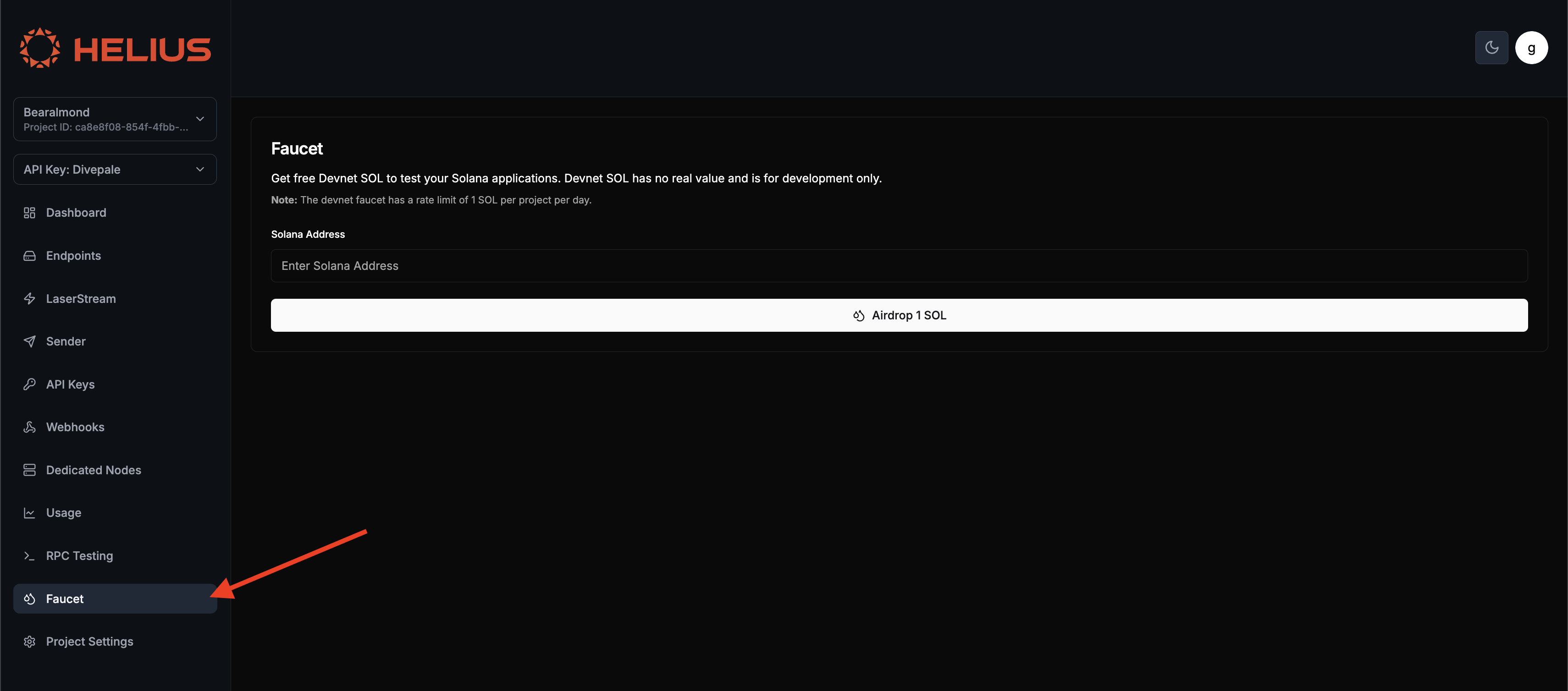 ### Step 3: Enter your Solana address
Enter your Solana wallet address in the provided field. You can get your wallet address from your Solana CLI using `solana address` or copy it from your wallet application.
### Step 4: Request Devnet SOL
Click "Airdrop 1 SOL" to receive your Devnet tokens.
### Step 5: Verify the transaction
Once your request is processed, you'll see a confirmation message with the transaction signature. You can verify the transaction on a [Solana explorer](https://orbmarkets.io/) or check your wallet balance.
## Conclusion
Getting Devnet SOL is essential for testing your Solana applications safely before deploying to mainnet. With a paid Helius plan, you can obtain Devnet SOL through either the Solana CLI or the Solana Devnet faucet in your dashboard.
### Next Steps
Continue learning about Solana development with these guides and references:
* [Maximize RPC performance](/rpc/optimization-techniques)
* Land transactions using [Sender](/sending-transactions/sender)
* Stream real-time data using [LaserStream](/laserstream)
* Explore and test [API Reference](/api-reference) for all RPC methods
* Understand [pricing](/billing/plans) for your Helius plan
### Step 3: Enter your Solana address
Enter your Solana wallet address in the provided field. You can get your wallet address from your Solana CLI using `solana address` or copy it from your wallet application.
### Step 4: Request Devnet SOL
Click "Airdrop 1 SOL" to receive your Devnet tokens.
### Step 5: Verify the transaction
Once your request is processed, you'll see a confirmation message with the transaction signature. You can verify the transaction on a [Solana explorer](https://orbmarkets.io/) or check your wallet balance.
## Conclusion
Getting Devnet SOL is essential for testing your Solana applications safely before deploying to mainnet. With a paid Helius plan, you can obtain Devnet SOL through either the Solana CLI or the Solana Devnet faucet in your dashboard.
### Next Steps
Continue learning about Solana development with these guides and references:
* [Maximize RPC performance](/rpc/optimization-techniques)
* Land transactions using [Sender](/sending-transactions/sender)
* Stream real-time data using [LaserStream](/laserstream)
* Explore and test [API Reference](/api-reference) for all RPC methods
* Understand [pricing](/billing/plans) for your Helius plan