> ## Documentation Index
> Fetch the complete documentation index at: https://www.helius.dev/docs/llms.txt
> Use this file to discover all available pages before exploring further.
# Protect Your Solana API Keys: Security Best Practices
> Secure your Helius Solana API keys from malicious actors. Access control rules, RPC proxy, and security best practices to prevent unauthorized usage and charges.
**API Key Security Alert**: Exposed API keys can lead to unauthorized usage, quota exhaustion, and unexpected charges. Always protect your keys in production applications.
## Why Key Protection Matters
When you expose API keys on the client side, malicious actors can discover and abuse them, potentially:
Malicious usage can quickly consume your API limits and cause service interruptions
Unauthorized requests can trigger auto-scaling charges or push you over plan limits
Exposed keys can provide access to sensitive data and operations
High unauthorized usage can impact your application's performance
## Protection Methods
Helius provides multiple layers of protection to secure your API keys:
Deploy your own proxy for maximum security and control.
A simple, open-source RPC proxy that you can deploy with 1-click to Cloudflare.
### Benefits of Using a Proxy
Your API key stays server-side, never exposed to clients
Implement your own rate limiting and usage controls
Filter and validate requests before they reach Helius
Monitor and analyze your API usage patterns
Configure precise access controls in your Helius dashboard to restrict API usage.
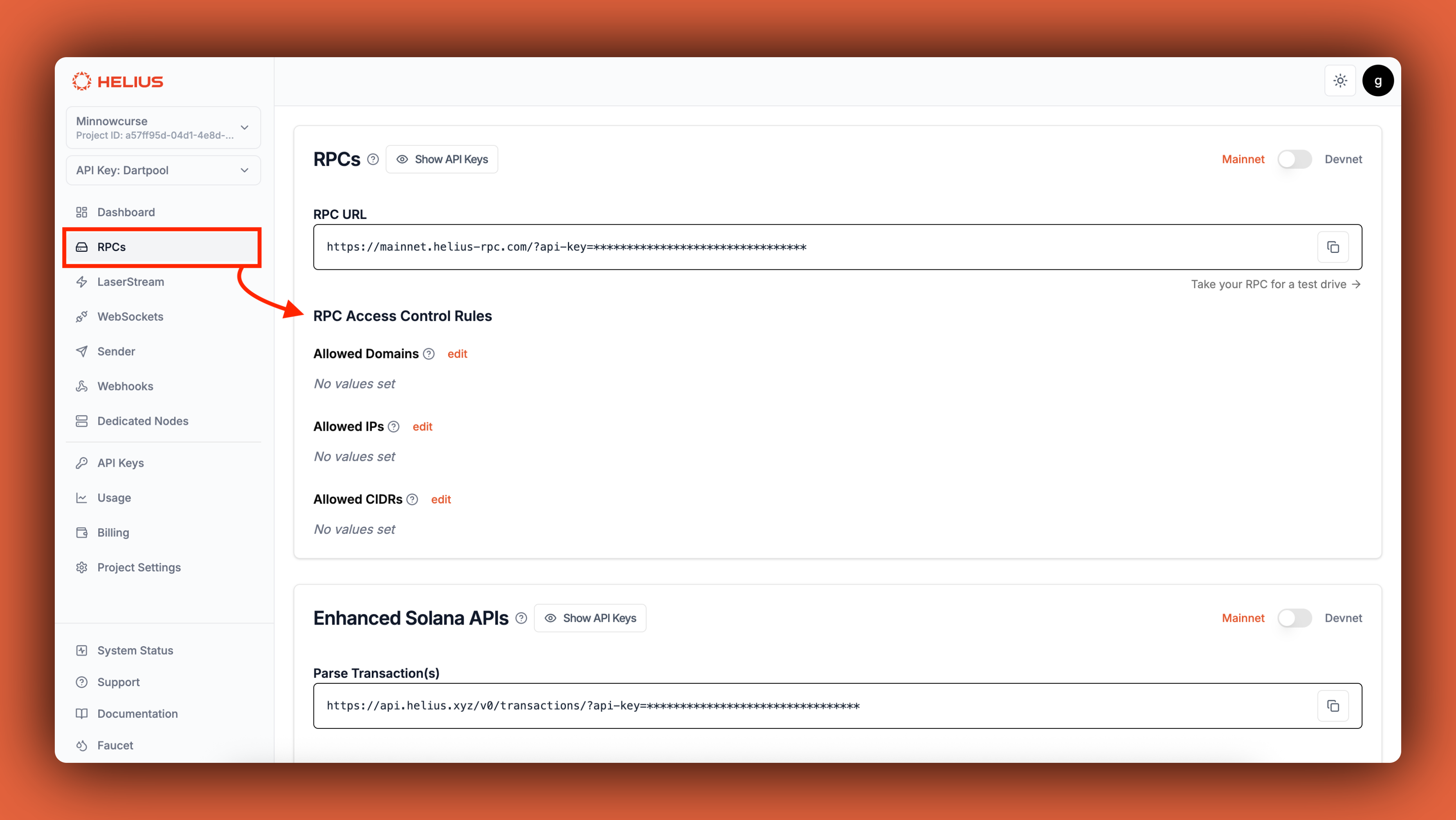 ### Available Rule Types
Restrict access to specific domains - perfect for web applications.
**Use cases:**
* Production websites (`yourdapp.com`)
* Staging environments (`staging.yourdapp.com`)
* Preview deployments (`preview.yourdapp.com`)
**Example configuration:**
```
yourdapp.com
www.yourdapp.com
staging.yourdapp.com
```
Restrict access to specific IP addresses - ideal for server applications.
**Use cases:**
* Backend servers with static IPs
* CI/CD pipelines
* Cloud-hosted services
**Example configuration:**
```
203.0.113.1
198.51.100.42
185.199.108.153
```
Only public IP addresses work here. Private/local IPs (like 192.168.x.x or 10.x.x.x) won't work.
Restrict access to IP ranges using CIDR notation - great for enterprise networks.
**Use cases:**
* Corporate public IP ranges
* Cloud provider IP ranges
* Data center IP blocks
**Example configuration:**
```
203.0.113.0/24
198.51.100.0/24
185.199.108.0/22
```
Only public IP ranges work here. Private CIDR blocks (192.168.0.0/16, 10.0.0.0/8, 172.16.0.0/12) won't work.
Use our secure URL for frontend applications without exposing your API key.
**Rate Limited**: Secure URLs are limited to 5 requests per second (RPS) per IP address, making them perfect for frontend applications.
**Paid plans only**: Secure URLs are available on paid plans. Free plans do not include this feature.
### How to Use Secure URLs
Find your secure URL in the Helius dashboard under the RPCs section
Use the secure URL instead of your regular RPC URL with API key
The secure URL doesn't require an API key parameter
```javascript theme={"system"}
// Instead of this (exposes API key):
const connection = new Connection('https://mainnet.helius-rpc.com/?api-key=YOUR_API_KEY');
// Use this (secure, no API key exposed):
const connection = new Connection('https://your-secure-url.helius-rpc.com');
```
**Perfect for**: Frontend applications, mobile apps, and any client-side code where you can't hide the API key.
## Best Practices
Never hardcode API keys in your source code. Use environment variables instead.
```javascript theme={"system"}
// ❌ Don't do this
const apiKey = "your-api-key-here";
// ✅ Do this instead
const apiKey = process.env.HELIUS_API_KEY;
```
Use different API keys for development, staging, and production environments.
```javascript theme={"system"}
const getApiKey = () => {
switch (process.env.NODE_ENV) {
case 'production':
return process.env.HELIUS_API_KEY_PROD;
case 'staging':
return process.env.HELIUS_API_KEY_STAGING;
default:
return process.env.HELIUS_API_KEY_DEV;
}
};
```
Rotate your API keys regularly and immediately if you suspect they've been compromised.
Create a new API key in your Helius dashboard
Update all applications to use the new key
Ensure all services are working with the new key
Delete the old key from your dashboard
Regularly check your API usage in the Helius dashboard for unusual patterns.
**Red flags to watch for:**
* Sudden spikes in usage
* Requests from unexpected locations
* High error rates
* Usage during off-hours
## Security Checklist
* [ ] Use environment variables for API keys
* [ ] Never commit API keys to version control
* [ ] Use different keys for different environments
* [ ] Set up access control rules for development domains
* [ ] Use secure URLs for frontend development
* [ ] Implement proper access control rules
* [ ] Use RPC proxy for maximum security
* [ ] Monitor API usage regularly
* [ ] Set up alerts for unusual usage patterns
* [ ] Rotate keys regularly
* [ ] Document your security procedures
* [ ] Have a key rotation procedure ready
* [ ] Know how to quickly revoke compromised keys
* [ ] Monitor for security breaches
* [ ] Have contact information for Helius support
* [ ] Keep backups of your security configurations
## Common Mistakes to Avoid
**Avoid these common security pitfalls:**
1. **Hardcoding keys in frontend JavaScript** - Always use secure URLs or proxies
2. **Committing keys to Git repositories** - Use environment variables and `.gitignore`
3. **Using production keys for development** - Separate keys for different environments
4. **Not setting access control rules** - Always configure domain/IP restrictions
5. **Ignoring unusual usage patterns** - Monitor your dashboard regularly
## Need Help?
Get help from the community and Helius team
Contact our support team for security concerns
### Available Rule Types
Restrict access to specific domains - perfect for web applications.
**Use cases:**
* Production websites (`yourdapp.com`)
* Staging environments (`staging.yourdapp.com`)
* Preview deployments (`preview.yourdapp.com`)
**Example configuration:**
```
yourdapp.com
www.yourdapp.com
staging.yourdapp.com
```
Restrict access to specific IP addresses - ideal for server applications.
**Use cases:**
* Backend servers with static IPs
* CI/CD pipelines
* Cloud-hosted services
**Example configuration:**
```
203.0.113.1
198.51.100.42
185.199.108.153
```
Only public IP addresses work here. Private/local IPs (like 192.168.x.x or 10.x.x.x) won't work.
Restrict access to IP ranges using CIDR notation - great for enterprise networks.
**Use cases:**
* Corporate public IP ranges
* Cloud provider IP ranges
* Data center IP blocks
**Example configuration:**
```
203.0.113.0/24
198.51.100.0/24
185.199.108.0/22
```
Only public IP ranges work here. Private CIDR blocks (192.168.0.0/16, 10.0.0.0/8, 172.16.0.0/12) won't work.
Use our secure URL for frontend applications without exposing your API key.
**Rate Limited**: Secure URLs are limited to 5 requests per second (RPS) per IP address, making them perfect for frontend applications.
**Paid plans only**: Secure URLs are available on paid plans. Free plans do not include this feature.
### How to Use Secure URLs
Find your secure URL in the Helius dashboard under the RPCs section
Use the secure URL instead of your regular RPC URL with API key
The secure URL doesn't require an API key parameter
```javascript theme={"system"}
// Instead of this (exposes API key):
const connection = new Connection('https://mainnet.helius-rpc.com/?api-key=YOUR_API_KEY');
// Use this (secure, no API key exposed):
const connection = new Connection('https://your-secure-url.helius-rpc.com');
```
**Perfect for**: Frontend applications, mobile apps, and any client-side code where you can't hide the API key.
## Best Practices
Never hardcode API keys in your source code. Use environment variables instead.
```javascript theme={"system"}
// ❌ Don't do this
const apiKey = "your-api-key-here";
// ✅ Do this instead
const apiKey = process.env.HELIUS_API_KEY;
```
Use different API keys for development, staging, and production environments.
```javascript theme={"system"}
const getApiKey = () => {
switch (process.env.NODE_ENV) {
case 'production':
return process.env.HELIUS_API_KEY_PROD;
case 'staging':
return process.env.HELIUS_API_KEY_STAGING;
default:
return process.env.HELIUS_API_KEY_DEV;
}
};
```
Rotate your API keys regularly and immediately if you suspect they've been compromised.
Create a new API key in your Helius dashboard
Update all applications to use the new key
Ensure all services are working with the new key
Delete the old key from your dashboard
Regularly check your API usage in the Helius dashboard for unusual patterns.
**Red flags to watch for:**
* Sudden spikes in usage
* Requests from unexpected locations
* High error rates
* Usage during off-hours
## Security Checklist
* [ ] Use environment variables for API keys
* [ ] Never commit API keys to version control
* [ ] Use different keys for different environments
* [ ] Set up access control rules for development domains
* [ ] Use secure URLs for frontend development
* [ ] Implement proper access control rules
* [ ] Use RPC proxy for maximum security
* [ ] Monitor API usage regularly
* [ ] Set up alerts for unusual usage patterns
* [ ] Rotate keys regularly
* [ ] Document your security procedures
* [ ] Have a key rotation procedure ready
* [ ] Know how to quickly revoke compromised keys
* [ ] Monitor for security breaches
* [ ] Have contact information for Helius support
* [ ] Keep backups of your security configurations
## Common Mistakes to Avoid
**Avoid these common security pitfalls:**
1. **Hardcoding keys in frontend JavaScript** - Always use secure URLs or proxies
2. **Committing keys to Git repositories** - Use environment variables and `.gitignore`
3. **Using production keys for development** - Separate keys for different environments
4. **Not setting access control rules** - Always configure domain/IP restrictions
5. **Ignoring unusual usage patterns** - Monitor your dashboard regularly
## Need Help?
Get help from the community and Helius team
Contact our support team for security concerns