> ## Documentation Index
> Fetch the complete documentation index at: https://www.helius.dev/docs/llms.txt
> Use this file to discover all available pages before exploring further.
# How to Use transactionSubscribe
> Stream real-time Solana transaction updates with `transactionSubscribe`. Monitor blockchain activity, filter by accounts, and receive instant notifications.
## What is `transactionSubscribe`?
The `transactionSubscribe` WebSocket method (a Helius extension to the standard Solana WebSocket API) enables real-time transaction events.
To use it, provide a `TransactionSubscribeFilter` and optionally include `TransactionSubscribeOptions` for further customization.
`transactionSubscribe` lives on the same unified `wss://mainnet.helius-rpc.com` and `wss://devnet.helius-rpc.com` [endpoints](https://www.helius.dev/docs/api-reference/endpoints) as the standard Solana subscription methods.
### `TransactionSubscribeFilter`
* `vote`: boolean flag to include/exclude vote-related transactions
* `failed`: boolean flag to include/exclude transactions that failed
* `signature`: filters updates to a specific transaction based on its signature
* `accountInclude`: list of accounts for which you want to receive transaction updates. Only one of the accounts must be included in the transaction updates (e.g., Account 1 OR 2).
* `accountExclude`: list of accounts you want to exclude from transaction updates
* `accountRequired`: transactions must include all of the specified accounts to be included in updates (e.g., Account 1 AND 2)
* `tokenAccounts`: opt-in associated token account (ATA) expansion (`balanceChanged`, `all`, or `none`). See [Watching a wallet, including token transfers](#watching-a-wallet-including-token-transfers) below.
You can include up to 50,000 addresses in the `accountInclude`, `accountExclude` and `accountRequired` arrays.
### TransactionSubscribeOptions (Optional)
* `commitment`: commitment level for fetching data (`processed`, `confirmed`, or `finalized`)
* `encoding`: encoding format of the returned data (`base58`, `base64`, or `jsonParsed`)
* `transactionDetails`: level of detail for the returned data (`full`, `signatures`, `accounts` and `none`)
* `showRewards`: boolean flag indicating if reward data should be included in the updates
* `maxSupportedTransactionVersion`: specifies the highest version of transactions you want to receive updates from. To get both legacy and v0 transactions, set the value to `0`.
`maxSupportedTransactionVersion` is required to return the accounts and full-level details of a given transaction (i.e., `transactionDetails: "accounts" | "full"`).
## Transaction Subscribe Example
In this example, we are subscribing to transactions that contain the Raydium account `675kPX9MHTjS2zt1qfr1NYHuzeLXfQM9H24wFSUt1Mp8`.
When a transaction occurs that contains `675k...1Mp8` account in the `accountKeys` of the transaction, we will receive a WSS notification.
Based on the subscription options, the transaction notification will be sent at the `processed` commitment level,`jsonParsed` encoding, `full` transaction details, and will show rewards.
```javascript theme={"system"}
const WebSocket = require('ws');
// Create a WebSocket connection
const ws = new WebSocket('wss://mainnet.helius-rpc.com/?api-key=');
// Function to send a request to the WebSocket server
function sendRequest(ws) {
const request = {
jsonrpc: "2.0",
id: 420,
method: "transactionSubscribe",
params: [
{
accountInclude: ["675kPX9MHTjS2zt1qfr1NYHuzeLXfQM9H24wFSUt1Mp8"]
},
{
commitment: "processed",
encoding: "jsonParsed",
transactionDetails: "full",
showRewards: true,
maxSupportedTransactionVersion: 0
}
]
};
ws.send(JSON.stringify(request));
}
// Function to send a ping to the WebSocket server
function startPing(ws) {
setInterval(() => {
if (ws.readyState === WebSocket.OPEN) {
ws.ping();
console.log('Ping sent');
}
}, 30000); // Ping every 30 seconds
}
// Define WebSocket event handlers
ws.on('open', function open() {
console.log('WebSocket is open');
sendRequest(ws); // Send a request once the WebSocket is open
startPing(ws); // Start sending pings
});
ws.on('message', function incoming(data) {
const messageStr = data.toString('utf8');
try {
const messageObj = JSON.parse(messageStr);
console.log('Received:', messageObj);
} catch (e) {
console.error('Failed to parse JSON:', e);
}
});
ws.on('error', function error(err) {
console.error('WebSocket error:', err);
});
ws.on('close', function close() {
console.log('WebSocket is closed');
});
```
### Example Notification
```json theme={"system"}
{
"jsonrpc": "2.0",
"method": "transactionNotification",
"params": {
"subscription": 4743323479349712,
"result": {
"transaction": {
"transaction": [
"Ae6zfSExLsJ/E1+q0jI+3ueAtSoW+6HnuDohmuFwagUo2BU4OpkSdUKYNI1dJfMOonWvjaumf4Vv1ghn9f3Avg0BAAEDGycH0OcYRpfnPNuu0DBQxTYPWpmwHdXPjb8y2P200JgK3hGiC2JyC9qjTd2lrug7O4cvSRUVWgwohbbefNgKQAAAAAAAAAAAAAAAAAAAAAAAAAAAAAAAAAAAAAAAAAAA0HcpwKokfYDDAJTaF/TWRFWm0Gz5/me17PRnnywHurMBAgIAAQwCAAAAoIYBAAAAAAA=",
"base64"
],
"meta": {
"err": null,
"status": {
"Ok": null
},
"fee": 5000,
"preBalances": [
28279852264,
158122684,
1
],
"postBalances": [
28279747264,
158222684,
1
],
"innerInstructions": [],
"logMessages": [
"Program 11111111111111111111111111111111 invoke [1]",
"Program 11111111111111111111111111111111 success"
],
"preTokenBalances": [],
"postTokenBalances": [],
"rewards": null,
"loadedAddresses": {
"writable": [],
"readonly": []
},
"computeUnitsConsumed": 0
}
},
"signature": "5moMXe6VW7L7aQZskcAkKGQ1y19qqUT1teQKBNAAmipzdxdqVLAdG47WrsByFYNJSAGa9TByv15oygnqYvP6Hn2p",
"slot": 224341380,
"transactionIndex": 42
}
}
}
```
## Watching a Wallet, Including Token Transfers
When you watch a wallet with `accountInclude`, you only match transactions where the wallet pubkey appears directly in the account keys. A common case slips through: when someone sends the wallet an SPL token (USDC, for example), the transfer touches the wallet's **associated token account (ATA)**, not the wallet pubkey — so a plain `accountInclude: [wallet]` subscription never sees it.
Set the `tokenAccounts` field to expand matching so the watched account also matches transactions where it **owns** a token balance:
* `balanceChanged`: match when the wallet owns a token balance whose amount changed (or whose token account was closed) in the transaction. Use this for "tell me when money actually moved." This is the narrower, lower-volume, and most common choice.
* `all`: match any transaction referencing a token balance the wallet owns, even if unchanged. Higher volume.
* `none`: no expansion. Same as omitting the field (the default).
Matching is owner-based: it catches any token account the wallet owns, including non-canonical ones, not just the derived ATA address. An invalid value returns JSON-RPC error `-32602`. Subscriptions that omit `tokenAccounts` behave exactly as before.
```javascript theme={"system"}
const ws = new WebSocket('wss://mainnet.helius-rpc.com/?api-key=');
ws.on('open', () => {
ws.send(JSON.stringify({
jsonrpc: '2.0',
id: 1,
method: 'transactionSubscribe',
params: [
{
accountInclude: [''],
tokenAccounts: 'balanceChanged' // also match the wallet's ATAs
},
{ commitment: 'confirmed', encoding: 'jsonParsed', maxSupportedTransactionVersion: 0 }
]
}));
setInterval(() => ws.ping(), 30_000);
});
ws.on('message', (data) => {
const msg = JSON.parse(data.toString());
const result = msg.params?.result;
if (!result) return;
// Token balances this wallet owns that changed in the tx
const owned = (result.transaction.meta.postTokenBalances || [])
.filter((b) => b.owner === '');
console.log(result.signature, owned);
});
```
## Monitoring new Jupiter DCAs
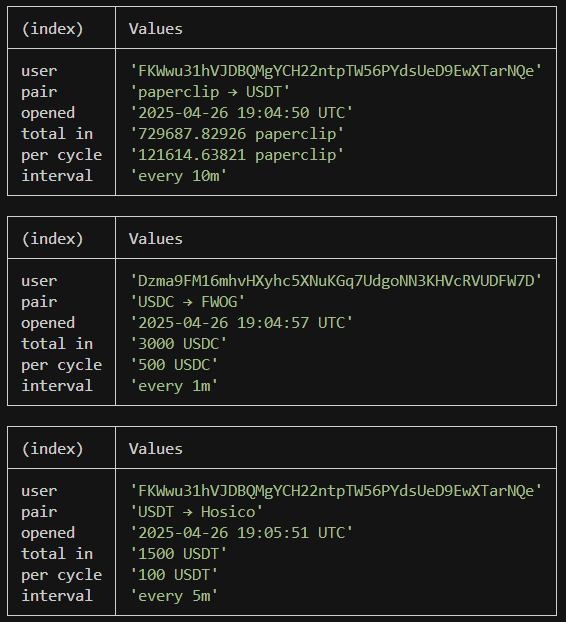
Jupiter DCA, or Dollar Cost Averaging, is a way to schedule recurring trades on Solana. Because these scheduled buy/sell orders are recorded on-chain, traders can use the `transactionSubscribe` method and [`getAsset`](/api-reference/das/getasset) to listen for new orders.
```javascript theme={"system"}
const WebSocket = require('ws');
const bs58 = require('bs58').default;
/* ───────────────────── 1. CONFIG ──────────────────────────── */
const API_KEY = process.env.HELIUS_API_KEY || (() => { throw new Error('Set HELIUS_API_KEY'); })();
const HELIUS_WS = `wss://mainnet.helius-rpc.com?api-key=${API_KEY}`;
const HELIUS_RPC = `https://mainnet.helius-rpc.com/?api-key=${API_KEY}`;
const DCA_PROGRAM_ID = 'DCA265Vj8a9CEuX1eb1LWRnDT7uK6q1xMipnNyatn23M';
/* ───────────────────── 2. BINARY DECODER ──────────────────── */
function decodeOpenDcaV2(base58Data) {
const buf = Buffer.from(bs58.decode(base58Data));
return {
appIdx: buf.readBigUInt64LE(8), // Application Index
inAmount: buf.readBigUInt64LE(16), // Input Amount
perCycle: buf.readBigUInt64LE(24), // Per Cycle
interval: buf.readBigUInt64LE(32) // Interval
};
}
const TOKEN_META = new Map(); // mint → { symbol, decimals }
/**
* Fetch symbol & decimals for a mint once then cache.
* Uses Helius getAsset DAS method: https://www.helius.dev/docs/api-reference/das/getasset
*/
async function getMeta(mint) {
if (TOKEN_META.has(mint)) return TOKEN_META.get(mint);
const body = {
jsonrpc: '2.0',
id: 'meow',
method: 'getAsset',
params: { id: mint, displayOptions: { showFungible: true } }
};
const { result } = await fetch(HELIUS_RPC, {
method: 'POST',
headers: { 'Content-Type': 'application/json' },
body: JSON.stringify(body)
}).then(r => r.json());
const tokenInfo = result.token_info || {};
const metadata = { symbol: tokenInfo.symbol || '?', decimals: tokenInfo.decimals ?? 0 };
TOKEN_META.set(mint, metadata);
return metadata;
}
/* ───────────────────── 4. PRETTY HELPERS ──────────────────── */
function formatTimestamp(unixSeconds) {
return new Date(Number(unixSeconds) * 1_000)
.toISOString()
.replace('T', ' ')
.replace('.000Z', ' UTC');
}
function formatInterval(seconds) {
if (seconds % 86_400 === 0) return `every ${seconds / 86_400}d`;
if (seconds % 3_600 === 0) return `every ${seconds / 3_600}h`;
if (seconds % 60 === 0) return `every ${seconds / 60}m`;
return `every ${seconds}s`;
}
function formatAmount(raw, decimals, symbol) {
const ui = Number(raw) / 10 ** decimals;
return `${ui} ${symbol}`;
}
/* ───────────────────── 5. WEBSOCKET SETUP ─────────────────── */
const ws = new WebSocket(HELIUS_WS);
ws.on('open', () => {
ws.send(JSON.stringify({
jsonrpc: '2.0',
id: 1,
method: 'transactionSubscribe',
params: [
{ failed: false, accountInclude: [DCA_PROGRAM_ID] },
{
commitment: 'confirmed',
encoding: 'jsonParsed',
transactionDetails: 'full',
maxSupportedTransactionVersion: 0
}
]
}));
setInterval(() => ws.ping(), 10_000);
});
/* ───────────────────── 6. MAIN MESSAGE HANDLER ────────────── */
ws.on('message', async raw => {
const payload = JSON.parse(raw);
const result = payload.params?.result;
if (!result) return;
// Look for the `OpenDcaV2` log message
const logs = result.transaction.meta.logMessages || [];
if (!logs.some(l => l.includes('OpenDcaV2'))) return;
// loop through all instructions in the transaction to find the DCA instruction
for (const ix of result.transaction.transaction.message.instructions) {
if (ix.programId !== DCA_PROGRAM_ID) continue;
try {
// 1) decode binary payload
const d = decodeOpenDcaV2(ix.data);
// 2) fetch token symbols / decimals (cached)
const [inMeta, outMeta] = await Promise.all([
getMeta(ix.accounts[3]), // input mint
getMeta(ix.accounts[4]) // output mint
]);
// 3) create a nice looking table
console.table({
user: ix.accounts[2],
pair: `${inMeta.symbol} → ${outMeta.symbol}`,
opened: formatTimestamp(d.appIdx),
'total in': formatAmount(d.inAmount, inMeta.decimals, inMeta.symbol),
'per cycle': formatAmount(d.perCycle, inMeta.decimals, inMeta.symbol),
interval: formatInterval(Number(d.interval))
});
} catch (e) {}
}
});
ws.on('error', console.error);
ws.on('close', () => process.exit(1));
```
### Example Notification
 ## Monitoring new pump.fun tokens
```javascript theme={"system"}
const WebSocket = require('ws');
const KEY = process.env.HELIUS_API_KEY ?? (() => { throw new Error('Set HELIUS_API_KEY'); })();
const WS_URL = `wss://mainnet.helius-rpc.com?api-key=${KEY}`;
const PUMP_FUN_PROG = '6EF8rrecthR5Dkzon8Nwu78hRvfCKubJ14M5uBEwF6P';
/* ────────── 2. OPEN WEBSOCKET & SUBSCRIBE ──────────────────── */
const ws = new WebSocket(WS_URL);
ws.on('open', () => {
ws.send(JSON.stringify({
jsonrpc : '2.0',
id : 1,
method : 'transactionSubscribe',
params : [
{ failed:false, accountInclude:[PUMP_FUN_PROG] },
{ commitment:'confirmed', encoding:'jsonParsed',
transactionDetails:'full', maxSupportedTransactionVersion:0 }
]
}));
// ping every 10 s so we don't get dropped
setInterval(() => ws.ping(), 10_000);
});
/* ────────── 3. MESSAGE HANDLER ─────────────────────────────── */
ws.on('message', raw => {
const payload = JSON.parse(raw);
const result = payload.params?.result;
if (!result) return;
const logs = result.transaction.meta.logMessages || [];
// filter for the pump.fun "InitializeMint2" log
if (!logs.some(l => l.includes('Instruction: InitializeMint2'))) return;
const sig = result.signature; // transaction signature
const keys = result.transaction.transaction.message.accountKeys
.map(k => k.pubkey);
// keys[0] → creator wallet
// keys[1] → the new token
console.table({
tx: sig,
creator: keys[0],
token: keys[1]
});
});
ws.on('error', console.error);
ws.on('close', () => process.exit(1));
```
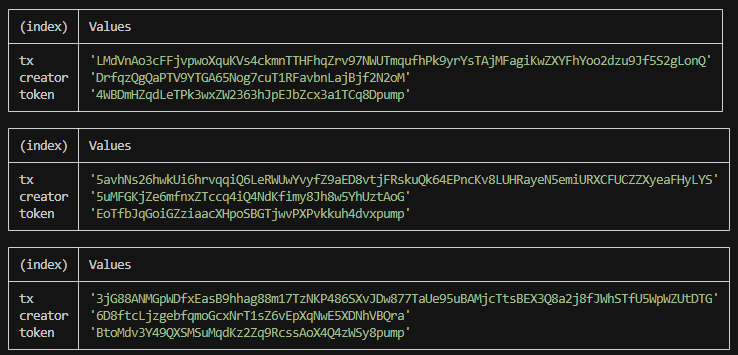
### Example Notification
## Monitoring new pump.fun tokens
```javascript theme={"system"}
const WebSocket = require('ws');
const KEY = process.env.HELIUS_API_KEY ?? (() => { throw new Error('Set HELIUS_API_KEY'); })();
const WS_URL = `wss://mainnet.helius-rpc.com?api-key=${KEY}`;
const PUMP_FUN_PROG = '6EF8rrecthR5Dkzon8Nwu78hRvfCKubJ14M5uBEwF6P';
/* ────────── 2. OPEN WEBSOCKET & SUBSCRIBE ──────────────────── */
const ws = new WebSocket(WS_URL);
ws.on('open', () => {
ws.send(JSON.stringify({
jsonrpc : '2.0',
id : 1,
method : 'transactionSubscribe',
params : [
{ failed:false, accountInclude:[PUMP_FUN_PROG] },
{ commitment:'confirmed', encoding:'jsonParsed',
transactionDetails:'full', maxSupportedTransactionVersion:0 }
]
}));
// ping every 10 s so we don't get dropped
setInterval(() => ws.ping(), 10_000);
});
/* ────────── 3. MESSAGE HANDLER ─────────────────────────────── */
ws.on('message', raw => {
const payload = JSON.parse(raw);
const result = payload.params?.result;
if (!result) return;
const logs = result.transaction.meta.logMessages || [];
// filter for the pump.fun "InitializeMint2" log
if (!logs.some(l => l.includes('Instruction: InitializeMint2'))) return;
const sig = result.signature; // transaction signature
const keys = result.transaction.transaction.message.accountKeys
.map(k => k.pubkey);
// keys[0] → creator wallet
// keys[1] → the new token
console.table({
tx: sig,
creator: keys[0],
token: keys[1]
});
});
ws.on('error', console.error);
ws.on('close', () => process.exit(1));
```
### Example Notification
 ## Managing Subscriptions
### Subscription IDs
When `transactionSubscribe` succeeds, the server returns a subscription ID in the `result` field. This is the same number that appears in `params.subscription` on every notification from that subscription:
```json Subscribe Response theme={"system"}
{
"jsonrpc": "2.0",
"result": 4743323479349712,
"id": 420
}
```
```json Notification theme={"system"}
{
"jsonrpc": "2.0",
"method": "transactionNotification",
"params": {
"subscription": 4743323479349712,
"result": {}
}
}
```
Store the subscription ID from the response. You need it to unsubscribe.
### Unsubscribing
To stop receiving notifications, call `transactionUnsubscribe` with the subscription ID. Each `transactionSubscribe` call on the same connection creates a separate subscription with its own ID, so make sure to unsubscribe before resubscribing to avoid receiving duplicate notifications.
```json Request theme={"system"}
{
"jsonrpc": "2.0",
"id": 421,
"method": "transactionUnsubscribe",
"params": [4743323479349712]
}
```
```json Response theme={"system"}
{
"jsonrpc": "2.0",
"result": true,
"id": 421
}
```
In this example, we subscribe to Raydium transactions, capture the subscription ID from the server's response, then unsubscribe using that ID. A few in-flight messages may still arrive briefly after calling `transactionUnsubscribe`. This is expected behavior.
```javascript theme={"system"}
const WebSocket = require('ws');
const ws = new WebSocket('wss://mainnet.helius-rpc.com/?api-key=');
let subscriptionId = null;
ws.on('open', () => {
ws.send(JSON.stringify({
jsonrpc: '2.0',
id: 420,
method: 'transactionSubscribe',
params: [
{ accountInclude: ['675kPX9MHTjS2zt1qfr1NYHuzeLXfQM9H24wFSUt1Mp8'] },
{
commitment: 'processed',
encoding: 'jsonParsed',
transactionDetails: 'full',
maxSupportedTransactionVersion: 0,
},
],
}));
setInterval(() => ws.ping(), 30000);
});
ws.on('message', (data) => {
const msg = JSON.parse(data.toString());
// Capture the subscription ID from the subscribe response
if (msg.id === 420 && msg.result !== undefined) {
subscriptionId = msg.result;
console.log('Subscribed, ID:', subscriptionId);
return;
}
// Handle transaction notifications
if (msg.method === 'transactionNotification') {
console.log('Received:', msg.params.result.signature);
}
});
function unsubscribe() {
if (subscriptionId !== null) {
ws.send(JSON.stringify({
jsonrpc: '2.0',
id: 421,
method: 'transactionUnsubscribe',
params: [subscriptionId],
}));
subscriptionId = null;
}
}
```
## Managing Subscriptions
### Subscription IDs
When `transactionSubscribe` succeeds, the server returns a subscription ID in the `result` field. This is the same number that appears in `params.subscription` on every notification from that subscription:
```json Subscribe Response theme={"system"}
{
"jsonrpc": "2.0",
"result": 4743323479349712,
"id": 420
}
```
```json Notification theme={"system"}
{
"jsonrpc": "2.0",
"method": "transactionNotification",
"params": {
"subscription": 4743323479349712,
"result": {}
}
}
```
Store the subscription ID from the response. You need it to unsubscribe.
### Unsubscribing
To stop receiving notifications, call `transactionUnsubscribe` with the subscription ID. Each `transactionSubscribe` call on the same connection creates a separate subscription with its own ID, so make sure to unsubscribe before resubscribing to avoid receiving duplicate notifications.
```json Request theme={"system"}
{
"jsonrpc": "2.0",
"id": 421,
"method": "transactionUnsubscribe",
"params": [4743323479349712]
}
```
```json Response theme={"system"}
{
"jsonrpc": "2.0",
"result": true,
"id": 421
}
```
In this example, we subscribe to Raydium transactions, capture the subscription ID from the server's response, then unsubscribe using that ID. A few in-flight messages may still arrive briefly after calling `transactionUnsubscribe`. This is expected behavior.
```javascript theme={"system"}
const WebSocket = require('ws');
const ws = new WebSocket('wss://mainnet.helius-rpc.com/?api-key=');
let subscriptionId = null;
ws.on('open', () => {
ws.send(JSON.stringify({
jsonrpc: '2.0',
id: 420,
method: 'transactionSubscribe',
params: [
{ accountInclude: ['675kPX9MHTjS2zt1qfr1NYHuzeLXfQM9H24wFSUt1Mp8'] },
{
commitment: 'processed',
encoding: 'jsonParsed',
transactionDetails: 'full',
maxSupportedTransactionVersion: 0,
},
],
}));
setInterval(() => ws.ping(), 30000);
});
ws.on('message', (data) => {
const msg = JSON.parse(data.toString());
// Capture the subscription ID from the subscribe response
if (msg.id === 420 && msg.result !== undefined) {
subscriptionId = msg.result;
console.log('Subscribed, ID:', subscriptionId);
return;
}
// Handle transaction notifications
if (msg.method === 'transactionNotification') {
console.log('Received:', msg.params.result.signature);
}
});
function unsubscribe() {
if (subscriptionId !== null) {
ws.send(JSON.stringify({
jsonrpc: '2.0',
id: 421,
method: 'transactionUnsubscribe',
params: [subscriptionId],
}));
subscriptionId = null;
}
}
```